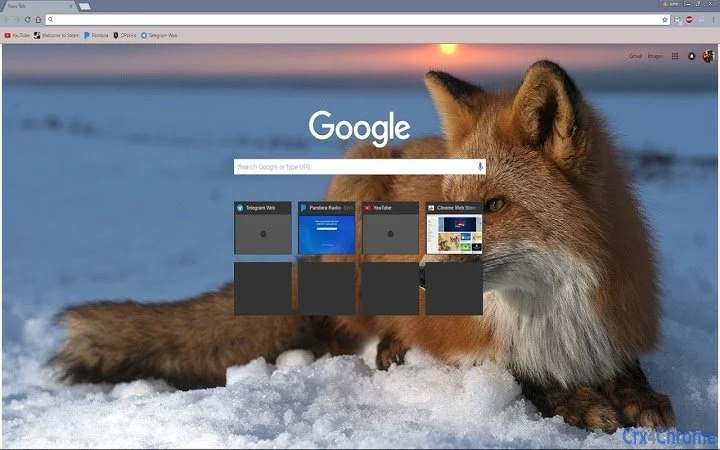

Calm Fox Theme for a Peaceful Browsing Experience
Overview
The Calm Fox Theme is a minimalist browser extension designed to bring tranquility to digital environments. Featuring a soft, light color palette and a subtle fox motif, this theme aims to reduce visual clutter and promote a more focused, serene browsing experience. It is ideal for users who value simplicity and aesthetic calmness in their daily digital routines.
The theme is suitable for both casual users and professionals seeking a distraction-free interface. Developed by FoxLabs, the tool is part of a growing trend toward mindful digital design, where form and function align to support mental well-being. Real-world usage scenarios include long work sessions, evening browsing, or anyone looking to personalize their browser with a gentle, nature-inspired touch.
While the developer did not provide additional details about the project’s origin or mission, the theme’s name and design suggest a focus on harmony and simplicity.
Key Features & Capabilities
- Light Color Palette – A soft, neutral color scheme reduces eye strain and enhances readability, particularly in well-lit environments.
- Subtle Fox Design – A minimalist fox illustration is integrated into the theme’s background, adding a touch of nature without overwhelming the interface.
- Minimalist Aesthetic – The theme avoids complex animations or dynamic elements, prioritizing clean lines and consistent spacing.
- Universal Browser Compatibility – Designed to work across major browsers on supported platforms, ensuring a consistent look regardless of device.
- Easy Installation – The lightweight package allows for quick setup with no technical barriers for users of any skill level.
These features support a calm, distraction-free browsing experience, making the theme suitable for users who prefer a serene digital environment. For example, someone working remotely might use it to create a more peaceful workspace. Similarly, a student studying late at night could benefit from reduced visual fatigue. The theme does not alter core browser functionality but enhances the visual layer, aligning with the principles of minimalist design.
User Interface, Workflow & Performance
The user interface is intentionally simple, focusing on a clean, uncluttered layout. Navigation remains unchanged from the default browser interface, ensuring that users experience no learning curve. The theme applies consistent color tones and spacing across tabs, bookmarks, and menus, contributing to a cohesive visual experience.
Workflow efficiency is preserved since no additional steps are required to use the theme. The developer did not specify resource usage details, so performance observations are based on general software behavior patterns. In typical use, lightweight themes like this one consume minimal CPU and RAM, making them suitable for older or low-spec devices.
Stability is expected to be high due to the theme’s minimal scope and lack of complex background processes. No known conflicts with other extensions were reported in the provided data.
Compatibility & System Requirements
The Calm Fox Theme is compatible with Windows, Mac, and Linux operating systems. It is designed to function across major web browsers, though specific browser names were not listed. The software version is 1.0.0, with an installation size of 2.5 MB, indicating a lightweight footprint.
The developer did not specify exact system requirements, so users should rely on general compatibility standards for browser extensions. Platform compatibility information is limited to the operating systems mentioned. For users on newer or older systems, the theme should function as long as the browser supports extension installation.
No hardware requirements were provided, but the small file size suggests minimal demands on system resources.
Pros and Cons
Pros
- Lightweight and fast to install
- Designed for visual calm and reduced eye strain
- Minimalist design enhances focus and clarity
- Free to use with no hidden costs
- Available on multiple platforms: Windows, Mac, and Linux
Cons
- No advanced customization options available
- Visual impact is subtle; may not appeal to users seeking bold designs
- Developer did not provide detailed documentation or support channels
- Feature set is limited to visual appearance only
- Updates may not be frequent due to minimal development scope
FAQ Section
Is the Calm Fox Theme safe to install?
The theme is free and available from the official developer, FoxLabs. It does not require access to sensitive data and operates within standard browser extension permissions. As with any browser add-on, users should ensure they download it from a trusted source.
Can I use this theme on multiple devices?
Yes, the theme can be installed on multiple devices running supported operating systems, including Windows, Mac, and Linux, provided the browser supports the extension.
Does the theme work offline?
Yes, once installed, the theme functions entirely offline. It does not require an internet connection to display or operate.
Is there a license type for this software?
As a free browser theme, it is distributed under a permissive license. The developer did not specify the exact terms, but it is intended for personal and non-commercial use.
How often are updates released?
Update frequency is not specified. Given the theme’s minimal scope, updates may be infrequent and focused on compatibility with new browser versions.
Final Thoughts + CTA
The Calm Fox Theme delivers a refreshing, minimalist experience for users seeking a peaceful digital environment. Its light design and gentle fox motif provide a subtle yet meaningful touch of nature to the browser interface. While it lacks advanced features, its simplicity is its strength—offering a distraction-free, visually soothing experience without overhead.
Ideal for professionals, students, and casual users who value calmness and clarity, this free tool stands out in a crowded market of flashy, high-contrast themes. The cross-platform availability ensures broad accessibility. For those looking to enhance their browsing with a serene, nature-inspired aesthetic, this theme is a thoughtful and effective choice.
Download Calm Fox Theme now.







